Data Cleaning of Absenteeism Dataset with Python
Absenteeism Data Cleaning and Preprocessing
This project showcases my data cleaning and preprocessing skills using the Python Pandas library within a Jupyter Notebook environment. The objective was to take a raw dataset on employee absenteeism and transform it into a clean, well-structured format suitable for analysis and machine learning modeling.
Tools Used
- Python
- Pandas
- Jupyter Notebook
Data Cleaning and Preprocessing Steps
The following steps were taken to clean and prepare the dataset.
Step 1: Initial Data Loading and Exploration
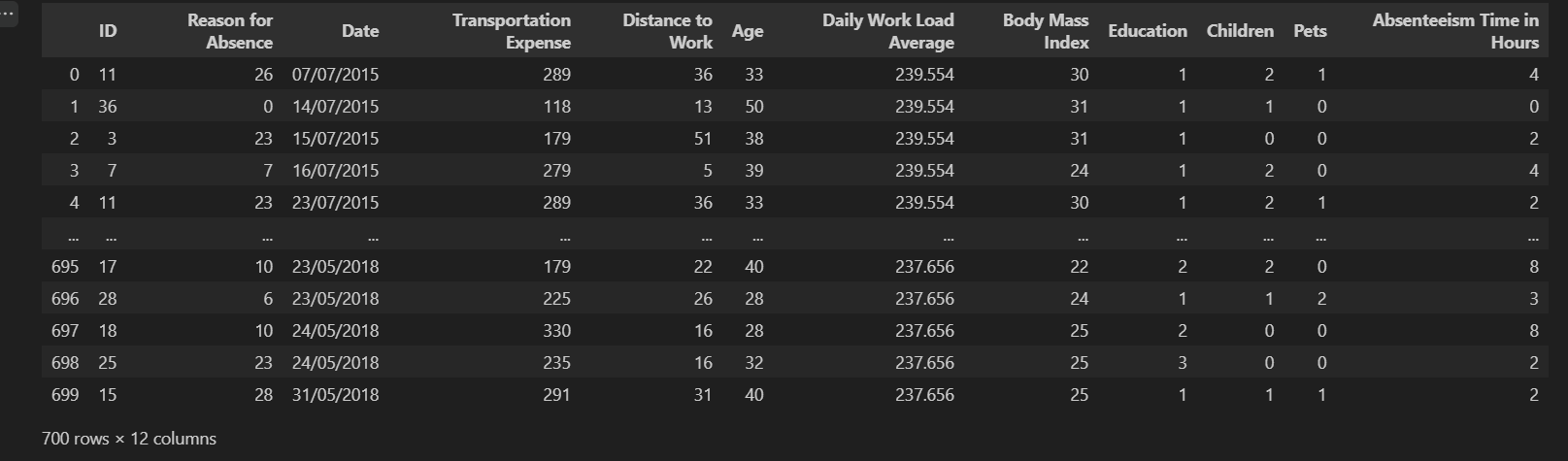
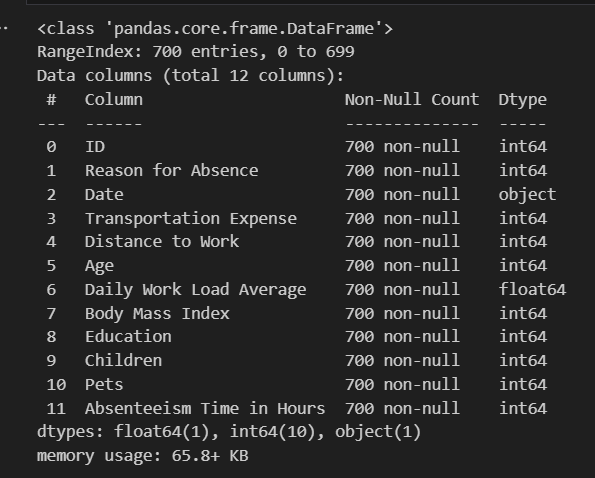
The first step was to load the dataset and get a high-level overview of its structure, data types, and missing values.
import pandas as pd

# Load the raw data
raw_csv_data = pd.read_csv("Absenteeism-data.csv")

# Display the dataframe
raw_csv_data

# Get a summary of the dataframe
print(raw_csv_data.info())
Output of raw_csv_data.head():
Output of raw_csv_data.info():
Step 2: Dropping Unnecessary Columns
The 'ID' column was identified as a unique identifier for each employee and not a feature that would be useful for analysis. Therefore, it was dropped.
# Create a copy to preserve the original data
df = raw_csv_data.copy()

# Drop the 'ID' column
df = df.drop(['ID'], axis=1)
Step 3: Handling Categorical Data ('Reason for Absence')
The 'Reason for Absence' column contained categorical data. To make it suitable for machine learning, I used one-hot encoding to convert these categories into numerical dummy variables.
# Get dummy variables for the 'Reason for Absence' column
reason_columns = pd.get_dummies(df['Reason for Absence'], drop_first=True)
Step 4: Date and Time Manipulation
The 'Date' column was converted from a string to a datetime object. From this, I extracted the month and the day of the week to create new, potentially insightful features.
# Convert 'Date' column to datetime objects
df['Date'] = pd.to_datetime(df['Date'], format='%d/%m/%Y')

# Extract month value
df['Month Value'] = df['Date'].apply(lambda x: x.month)

# Extract day of the week
df['Day of the Week'] = df['Date'].apply(lambda x: x.weekday())
Step 5: Final Cleaned Dataset
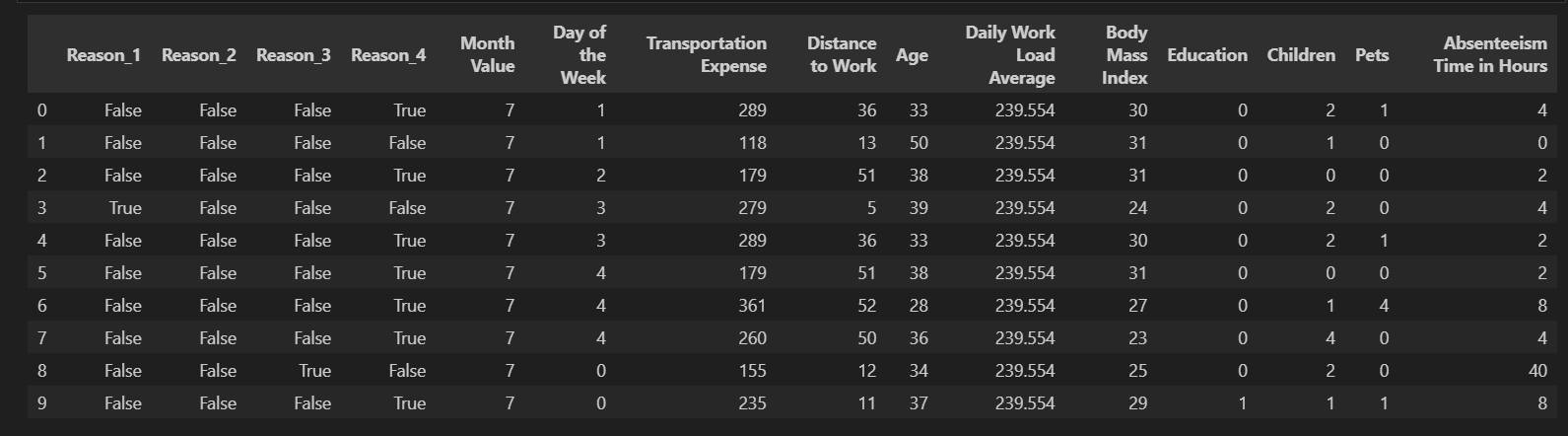
After all the cleaning and preprocessing steps, a final, clean dataframe was created, ready for analysis.
# Create a final cleaned dataframe
df_cleaned = df.copy()

# Display the head of the cleaned dataframe
print(df_cleaned.head(10))
Output of df_cleaned.head(10):
Results & Impact
Through this data cleaning project, I successfully transformed a raw, messy dataset into a clean and structured one, demonstrating my ability to:
- Identify and handle irrelevant or redundant data.
- Convert categorical features into a numerical format suitable for modeling.
- Perform feature engineering by extracting valuable information from existing columns (like dates).
- Follow a systematic and organized data cleaning workflow.
- Prepare a dataset that is ready for exploratory data analysis, visualization, and machine learning.
Learnings and Takeaways
This project was a great exercise in applying data cleaning techniques in a practical scenario. Key takeaways include:
- Deepened my proficiency in using the Pandas library for a wide range of data manipulation tasks.
- Gained practical experience in feature engineering, specifically with datetime objects.
- Reinforced the importance of a step-by-step, methodical approach to data cleaning.
- Improved my ability to document and present a data cleaning process clearly in a Jupyter Notebook.
Project information
- Category Data Cleaning & Preprocessing
- Tools Python, Pandas, Jupyter Notebook
- Project date August 2024
- Project Link GitHub Repository
- View Notebook on GitHub